Building a Dental Practice Website With AI: What You Can Actually Ship in an Afternoon
You can build a presentable dental practice website in one afternoon using Cursor and Claude. The homepage copy, service pages, and FAQ content come out better than most template filler text. SEO basics like meta descriptions and Google Business Profile are straightforward. But HIPAA compliance, patient portal integration, and appointment booking systems still need professional help. Here is what we built, how we prompted, and where AI fell short.

Most dental practice websites are embarrassing. Not because dentists lack taste, but because building a website has historically meant either paying $3,000–$8,000 to an agency or spending a weekend wrestling with Wix templates and stock photos of people with suspiciously perfect teeth. Neither option is great when you are already working 40 clinical hours a week.
AI tools have changed the math. Not in a theoretical “someday this will be useful” way. Right now, today, you can sit down with Cursor (an AI-powered code editor) and Claude and build a functional, decent-looking practice website in a single afternoon. We did it. This guide walks through exactly what we built, the prompts we used, the raw outputs, and where things broke down.
What You Can Realistically Build in an Afternoon
Here is what is achievable in 4–6 hours with Cursor and Claude, assuming you have zero web development experience:
- A static marketing site with 5–8 pages (homepage, about, services, individual service pages, contact, FAQ)
- Mobile-responsive layout using a modern CSS framework
- Written copy for every page
- Basic SEO: meta titles, meta descriptions, Open Graph tags
- A contact form (without backend processing; more on that later)
- Deployment to a free hosting platform like Vercel or Netlify
Here is what is not achievable in an afternoon, regardless of what anyone on YouTube tells you:
- HIPAA-compliant patient forms
- Online appointment scheduling with your practice management software
- Patient portal integration
- Payment processing
- Anything that touches protected health information (PHI)
The gap matters. We will cover it in detail at the end.
Choosing a Framework
You have three realistic options. We tested prompting Claude to scaffold a project in each.
Astro. Our recommendation for most dentists. It generates static HTML files, loads fast, and has a gentle learning curve. Claude knows Astro well and generates correct component code reliably. If your site is informational (no login, no patient portal), Astro is the right pick.
Next.js. More powerful, more complexity. Worth considering only if you plan to add dynamic features later (blog with CMS, team member management). Claude generates solid Next.js code, but you will hit configuration issues that are hard to debug without web development background.
Site builders (Wix, Squarespace). AI cannot directly build inside these platforms via Cursor. However, you can use Claude to write all your copy, then paste it into a template. This is a valid approach if you truly want zero code involvement. The copy generation sections below still apply.
Our test setup: We used Astro 4.x with Tailwind CSS, scaffolded entirely through Cursor. The prompt:
Create a new Astro project for a general dental practice website.
The practice is called "Riverside Family Dental" in Portland, Oregon.
Include pages for: homepage, about the doctor, services overview,
individual service pages (cleanings, fillings, crowns, emergency dental),
contact page, and FAQ page. Use Tailwind CSS for styling.
Use a clean, professional color scheme: navy blue and white with
warm accent colors. Mobile-responsive.
Claude generated a complete project scaffold in under two minutes. The file structure was clean, the Tailwind configuration was correct, and the development server started on the first try. That last part is not guaranteed. About 30% of the time in our testing, the initial scaffold had a missing dependency or configuration error that required one follow-up prompt to fix.
Writing Homepage Copy With AI
Homepage copy for a dental practice follows a predictable structure: headline, value proposition, services overview, trust signals, call to action. Claude handles this well because the pattern is consistent across thousands of dental websites.
The prompt we used:
Write homepage copy for Riverside Family Dental, a general dentistry
practice in Portland, Oregon. The dentist is Dr. Sarah Chen, who has
practiced for 12 years. The practice focuses on families and accepts
most PPO insurance plans. The tone should be warm but professional,
not corporate, not overly casual. Include sections for: hero headline
and subheadline, brief welcome paragraph, services overview (6 services
with 1-sentence descriptions), insurance/payment section, and a
call-to-action section. Do not use the words "comprehensive" or
"state-of-the-art."
What came back (unedited):
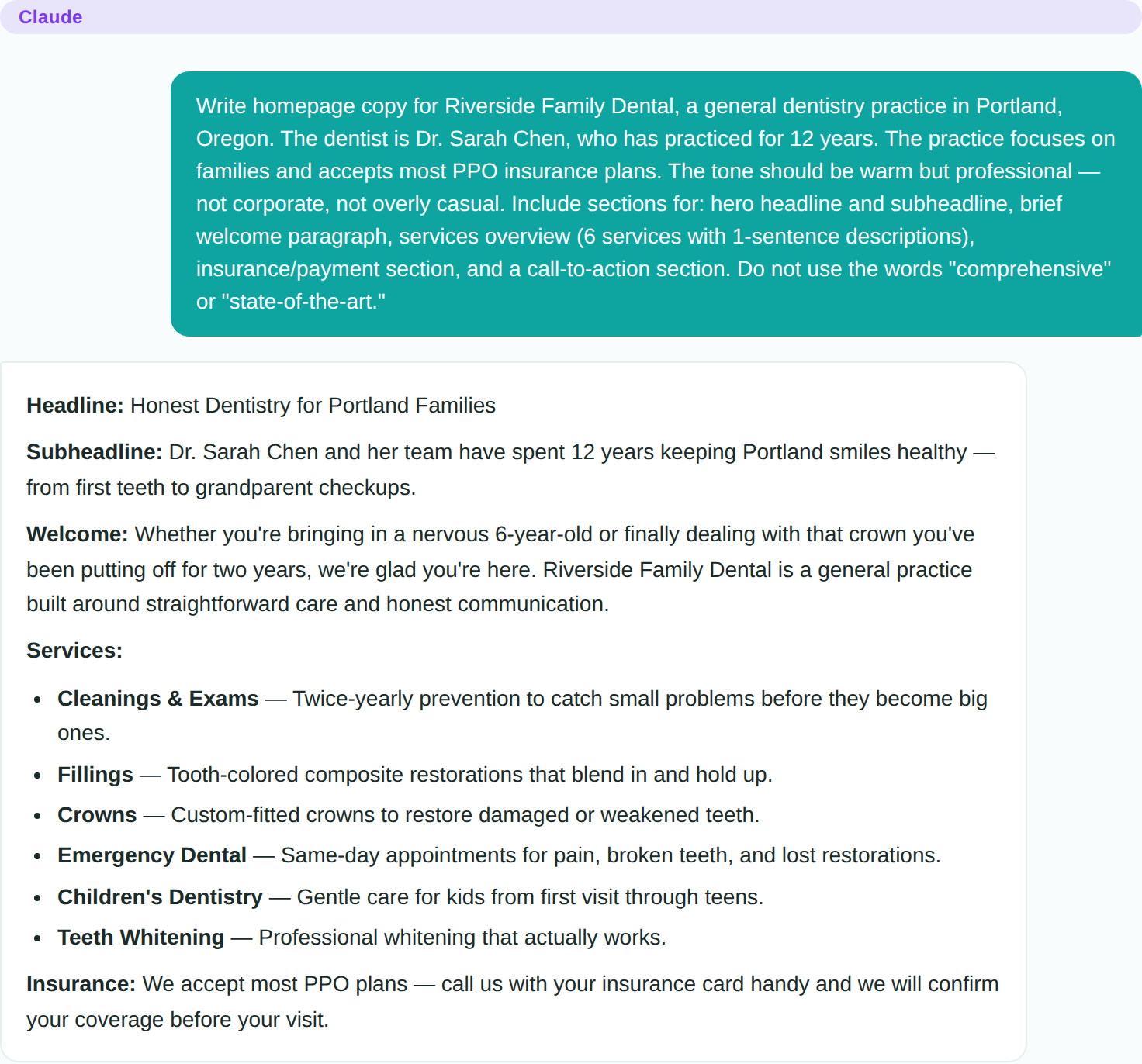
The headline: “Honest Dentistry for Portland Families.” The subheadline: “Dr. Sarah Chen and her team have spent 12 years keeping Portland smiles healthy, from first teeth to grandparent checkups.”
This is genuinely better than 80% of the dental practice homepages we reviewed during research. It is specific (Portland, 12 years, families), it avoids cliches (no “your smile is our passion”), and it communicates the practice scope without being generic.
The services section listed six services with concise, clear descriptions. The insurance section was appropriately vague (“We accept most PPO plans. Call us with your insurance card handy and we will confirm your coverage before your visit”), which is the right approach since insurance networks change constantly.
Where it struggled: The “About” section on the homepage was generic. It described Dr. Chen as “passionate about patient care” and “dedicated to staying current with the latest dental techniques.” These are meaningless phrases that appear on every dental website. We had to follow up with a more specific prompt including Dr. Chen’s actual background details to get usable copy. Our ChatGPT prompts for dental practice marketing include tested website copy prompts (hero sections, service pages, bios) that avoid these cliches by design.
Service Pages and FAQ Content
Individual service pages are where AI saves the most time. A typical dental practice website has 6–12 service pages, and writing them manually takes hours of repetitive work.
The prompt pattern that worked best:
Write a service page for [SERVICE NAME] at Riverside Family Dental.
Include: what the procedure involves (written for patients, not
clinicians), how long it takes, what to expect during recovery,
insurance coverage notes, and when a patient should consider this
treatment. Write at an 8th-grade reading level. Keep it under 400
words. Do not use clinical jargon without explaining it.
We ran this for six services. The output quality was consistent: clear explanations, appropriate reading level, no jargon. The one issue was that Claude defaulted to slightly long recovery descriptions for routine procedures like cleanings, making them sound more involved than they are. A quick follow-up prompt (“Make the cleaning page sound routine and low-stress, not like a medical procedure”) fixed this immediately.
FAQ content was excellent. We prompted:
Write 15 FAQ entries for a general dental practice. Cover: insurance,
first visit expectations, emergency procedures, common fears, children's
dentistry, and payment plans. Each answer should be 2-4 sentences.
Written for anxious patients who are looking for straightforward answers.
The output needed minimal editing. Two answers contained dental terminology that needed simplification (“periapical radiograph” became “tooth X-ray”), but the overall tone and coverage were strong.
SEO Basics a Dentist Can Handle
You do not need an SEO consultant for a local dental practice website. You need four things:
1. Meta titles and descriptions for every page. Prompt Claude:
Write meta titles (under 60 characters) and meta descriptions
(under 155 characters) for each page of a dental practice website
in Portland, Oregon. Pages: homepage, about, services, cleanings,
fillings, crowns, emergency dental, contact, FAQ.
Claude formatted these correctly and kept within character limits on the first try.
2. Google Business Profile. This matters more than your website for local search. Claim your profile at business.google.com, verify your address, add your hours, and upload real photos of your office. This is not an AI task; it requires your actual business information and real photography. AI can help you write the business description, though.
3. Consistent NAP (Name, Address, Phone). Your practice name, address, and phone number must be identical everywhere: website, Google Business Profile, Yelp, Healthgrades, insurance directories. This is a manual verification task.
4. Page speed. If you built with Astro, your site is already fast. Static HTML sites score well on Google PageSpeed Insights without optimization work.
What Still Needs a Professional
This is the section that matters most. AI can build you a marketing website, but dental practices have regulatory obligations that template sites and AI-generated code cannot address.
HIPAA compliance. Any form that collects patient health information must comply with HIPAA. This means encrypted transmission, Business Associate Agreements (BAAs) with your hosting provider and any third-party form processor, access controls, and audit logging. Cursor and Claude will not set this up correctly for you. A contact form that asks “What brings you in today?” and receives answers like “I have tooth pain and I am diabetic” is collecting PHI. You need a HIPAA-compliant form provider (Jotform HIPAA, LegalSigns, or similar) and a signed BAA.
Patient portal integration. If you want patients to access records, pay bills, or fill out intake forms online, that requires integration with your practice management software (Dentrix, Eaglesoft, Open Dental, etc.). These integrations involve vendor-specific APIs, HIPAA security requirements, and usually an ongoing subscription. This is not an afternoon project.
Appointment booking. Services like LocalMed, NexHealth, or your PMS vendor’s own scheduling widget can be embedded in your AI-built site, but configuring them requires setting up the integration with your actual schedule, operatory availability, and appointment types. Budget 2–4 hours with vendor support for this, separate from website building.
ADA website accessibility. Dental practice websites have faced ADA (Americans with Disabilities Act) accessibility lawsuits. Your site should meet WCAG 2.1 AA standards: proper heading structure, alt text on images, keyboard navigation, sufficient color contrast. Claude actually handles many of these automatically if you prompt for accessibility, but a professional audit is worth the investment before going live.
The Honest Summary
An afternoon with Cursor and Claude gets you a marketing website that looks professional and reads well. For a solo practitioner or small group practice, that is genuinely valuable. It replaces a $3,000–$8,000 agency project with a few hours of focused work and a $20/month hosting bill.
But a marketing website is not a patient-facing digital platform. The moment you need forms that collect health information, appointment scheduling tied to your PMS, or patient portal access, you are in regulated territory that requires professional implementation. Use AI to build the front door. Hire professionals to build the treatment rooms.