- Cursor and Claude can help a dentist draft a presentable practice website: homepage copy, service pages and FAQ content. SEO basics like meta descriptions and Google Business Profile are straightforward. HIPAA compliance, patient portal integration and appointment booking systems still need professional help. This guide shows the prompts to use and where AI output needs review.
Most dental practice websites are embarrassing. Not because dentists lack taste, but because building a website has historically meant either paying $3,000–$8,000 to an agency or spending a weekend wrestling with Wix templates and stock photos of people with suspiciously perfect teeth. Neither option is great when you are already working 40 clinical hours a week.
AI tools have changed the math. Not in a theoretical “someday this will be useful” way. Today you can sit down with Cursor (an AI-powered code editor) and Claude and draft a functional practice website in a short working session. This guide walks through the prompts to use, example outputs, and where AI help runs out.
NOTE
About the examples
Example outputs were generated with Claude (claude-sonnet-4-6). AI output varies from run to run and must be reviewed by your practice before use. No website built from these prompts has been deployed to production or used by a dental practice, and patient-facing features such as appointment booking or contact forms were not tried with real patient data.
What You Can Realistically Build in an Afternoon
Here is a realistic goal for a first working session with Cursor and Claude, even without web development experience:
- A static marketing site with 5–8 pages (homepage, about, services, individual service pages, contact, FAQ)
- Mobile-responsive layout using a modern CSS framework
- Written copy for every page
- Basic SEO: meta titles, meta descriptions, Open Graph tags
- A contact form (without backend processing; more on that later)
- Deployment to a free hosting platform like Vercel or Netlify
Here is what is not achievable in an afternoon, regardless of what anyone on YouTube tells you:
- HIPAA-compliant patient forms
- Online appointment scheduling with your practice management software
- Patient portal integration
- Payment processing
- Anything that touches protected health information (PHI)
The gap matters. We will cover it in detail at the end.
Choosing a Framework
You have three realistic options. Claude can help with each.
Astro. A good fit for most dentists. It generates static HTML files, loads fast, and has a gentle learning curve. Claude can generate Astro component code. If your site is informational (no login, no patient portal), Astro is the right pick.
Next.js. More powerful, more complexity. Worth considering only if you plan to add dynamic features later (blog with CMS, team member management). Claude can generate Next.js code, but configuration issues are hard to debug without a web development background.
Site builders (Wix, Squarespace). AI cannot directly build inside these platforms via Cursor. However, you can use Claude to write all your copy, then paste it into a template. This is a valid approach if you truly want zero code involvement. The copy generation sections below still apply.
TIP
Start With Astro for a Static Practice Site
For an informational dental practice website with no patient portal or login, Astro generates static HTML that loads fast, scores well on PageSpeed, and is simple for AI tools to generate. Save Next.js for when you need dynamic features.
Example scaffold prompt (Astro with Tailwind CSS, run through Cursor):
Create a new Astro project for a general dental practice website.
The practice is called "Riverside Family Dental" in Portland, Oregon.
Include pages for: homepage, about the doctor, services overview,
individual service pages (cleanings, fillings, crowns, emergency dental),
contact page, and FAQ page. Use Tailwind CSS for styling.
Use a clean, professional color scheme: navy blue and white with
warm accent colors. Mobile-responsive.
After the scaffold is generated, check that the development server starts. AI-generated projects can have a missing dependency or configuration error, which usually takes a follow-up prompt to fix.
Writing Homepage Copy With AI
Homepage copy for a dental practice follows a predictable structure: headline, value proposition, services overview, trust signals, call to action. The pattern is consistent across dental websites, so a language model can produce a reasonable first draft.
Example prompt:
Write homepage copy for Riverside Family Dental, a general dentistry
practice in Portland, Oregon. The dentist is Dr. Sarah Chen, who has
practiced for 12 years. The practice focuses on families and accepts
most PPO insurance plans. The tone should be warm but professional,
not corporate, not overly casual. Include sections for: hero headline
and subheadline, brief welcome paragraph, services overview (6 services
with 1-sentence descriptions), insurance/payment section, and a
call-to-action section. Do not use the words "comprehensive" or
"state-of-the-art."
Example output (Claude):
The headline: “Honest Dentistry for Portland Families.” The subheadline: “Dr. Sarah Chen and her team have spent 12 years keeping Portland smiles healthy, from first teeth to grandparent checkups.”
The headline uses details from the prompt (Portland, 12 years, families) and avoids the cliches the prompt banned. The example output also included a services section with six short descriptions and an insurance section worded loosely (“We accept most PPO plans. Call us with your insurance card handy and we will confirm your coverage before your visit”). Keeping insurance wording general is sensible because networks change often.
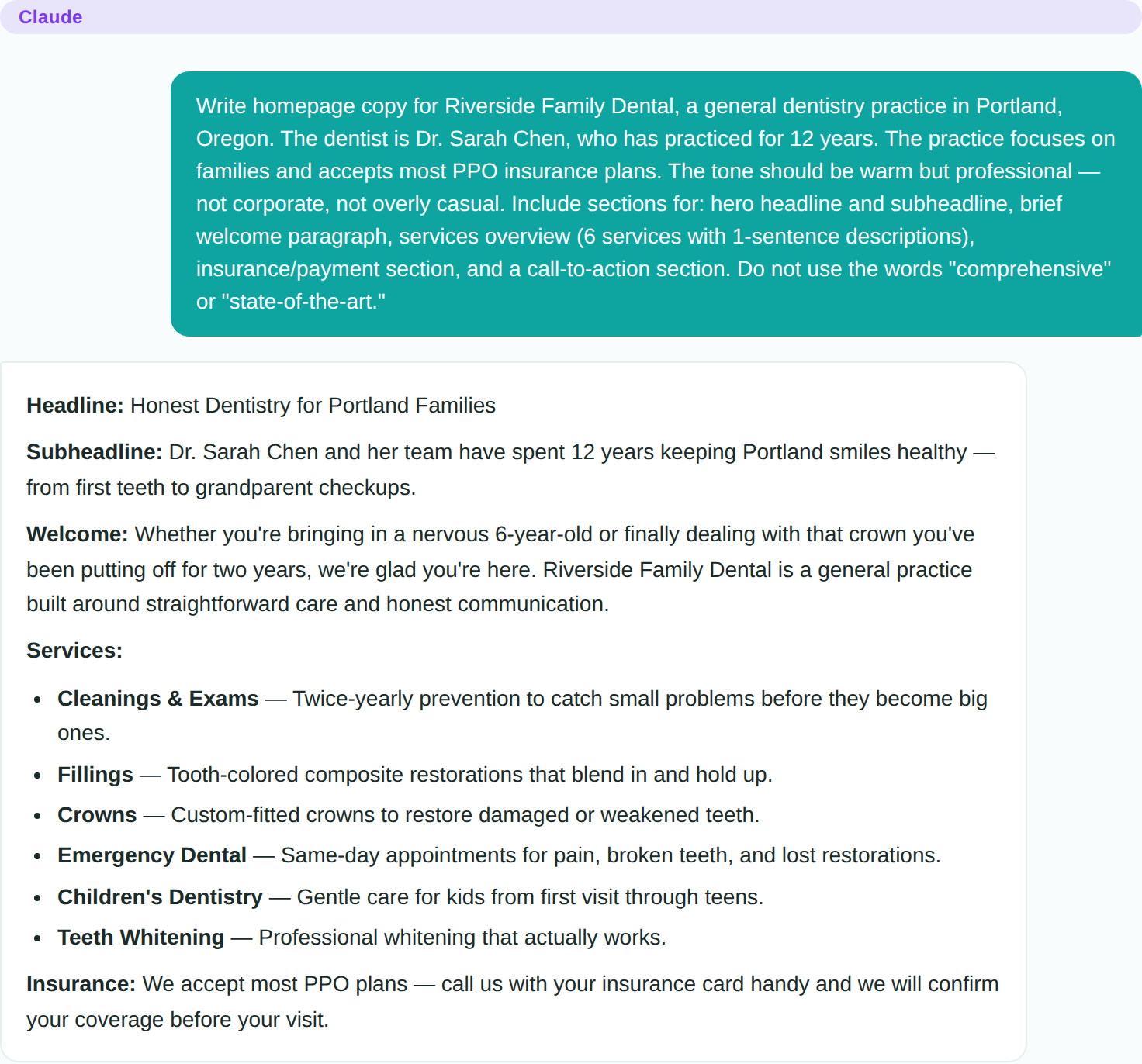
Example output from Claude for a dental practice homepage. The prompt banned ‘comprehensive’ and ‘state-of-the-art’.
Watch the About section. About copy tends to fall back on phrases like “passionate about patient care” and “dedicated to staying current with the latest dental techniques,” which appear on many dental websites. Give the model the doctor’s actual background in a follow-up prompt. Our ChatGPT prompts for dental practice marketing include website copy prompts (hero sections, service pages, bios) that try to avoid these cliches.
Service Pages and FAQ Content
Individual service pages are where AI saves the most time. A typical dental practice website has 6–12 service pages, and writing them manually takes hours of repetitive work.
A prompt pattern for service pages:
Write a service page for [SERVICE NAME] at Riverside Family Dental.
Include: what the procedure involves (written for patients, not
clinicians), how long it takes, what to expect during recovery,
insurance coverage notes, and when a patient should consider this
treatment. Write at an 8th-grade reading level. Keep it under 400
words. Do not use clinical jargon without explaining it.
Check each page for reading level, jargon and length. Recovery descriptions in particular can come out longer than needed for routine procedures like cleanings, making them sound more involved than they are. A follow-up prompt such as “Make the cleaning page sound routine and low-stress, not like a medical procedure” can adjust the tone.
FAQ content is another good fit. A prompt:
Write 15 FAQ entries for a general dental practice. Cover: insurance,
first visit expectations, emergency procedures, common fears, children's
dentistry, and payment plans. Each answer should be 2-4 sentences.
Written for anxious patients who are looking for straightforward answers.
Review the answers for dental terminology and simplify it (for example, “periapical radiograph” becomes “tooth X-ray”), and confirm each answer matches your practice’s actual policies.
SEO Basics a Dentist Can Handle
You do not need an SEO consultant for a local dental practice website. You need four things:
1. Meta titles and descriptions for every page. Prompt Claude:
Write meta titles (under 60 characters) and meta descriptions
(under 155 characters) for each page of a dental practice website
in Portland, Oregon. Pages: homepage, about, services, cleanings,
fillings, crowns, emergency dental, contact, FAQ.
Check the character counts yourself, since language models do not always stay within length limits.
2. Google Business Profile. This matters more than your website for local search. Claim your profile at business.google.com, verify your address, add your hours, and upload real photos of your office. This is not an AI task; it requires your actual business information and real photography. AI can help you write the business description, though.
3. Consistent NAP (Name, Address, Phone). Your practice name, address, and phone number must be identical everywhere: website, Google Business Profile, Yelp, Healthgrades, insurance directories. This is a manual verification task.
4. Page speed. If you built with Astro, your site is already fast. Static HTML sites score well on Google PageSpeed Insights without optimization work.
What Still Needs a Professional
This is the section that matters most. AI can build you a marketing website, but dental practices have regulatory obligations that template sites and AI-generated code cannot address.
WARNING
HIPAA Applies to Website Forms
Any form that collects patient health information must comply with HIPAA: encrypted transmission, Business Associate Agreements (BAAs) with your hosting provider and form processor, access controls, and audit logging. A contact form asking “What brings you in today?” is collecting PHI the moment someone mentions a health condition. AI tools will not configure HIPAA compliance for you. Use a HIPAA-compliant form provider and get a signed BAA.
HIPAA compliance. Any form that collects patient health information must comply with HIPAA. This means encrypted transmission, Business Associate Agreements (BAAs) with your hosting provider and any third-party form processor, access controls, and audit logging. Cursor and Claude will not set this up correctly for you. A contact form that asks “What brings you in today?” and receives answers like “I have tooth pain and I am diabetic” is collecting PHI. You need a HIPAA-compliant form provider (Jotform HIPAA, LegalSigns, or similar) and a signed BAA.
Patient portal integration. If you want patients to access records, pay bills, or fill out intake forms online, that requires integration with your practice management software (Dentrix, Eaglesoft, Open Dental, etc.). These integrations involve vendor-specific APIs, HIPAA security requirements, and usually an ongoing subscription. This is not an afternoon project.
Appointment booking. Services like LocalMed, NexHealth, or your PMS vendor’s own scheduling widget can be embedded in your AI-built site, but configuring them requires setting up the integration with your actual schedule, operatory availability, and appointment types. Budget 2–4 hours with vendor support for this, separate from website building.
ADA website accessibility. Dental practice websites have faced ADA (Americans with Disabilities Act) accessibility lawsuits. Your site should meet WCAG 2.1 AA standards: proper heading structure, alt text on images, keyboard navigation, sufficient color contrast. You can prompt Claude to include accessible markup, but a professional audit is worth the investment before going live.
The Honest Summary
A working session with Cursor and Claude can produce a draft marketing website. For a solo practitioner or small group practice, that can be valuable. It can replace an agency project with a few hours of focused work and a low monthly hosting bill.
But a marketing website is not a patient-facing digital platform. The moment you need forms that collect health information, appointment scheduling tied to your PMS, or patient portal access, you are in regulated territory that requires professional implementation. Use AI to build the front door. Hire professionals to build the treatment rooms.
Correction, October 23, 2026. An earlier version of this article said the site had been built and tested step by step, and reported results such as scaffold failure rates and how the outputs compared with other dental websites. That testing did not take place, and those claims have been removed. The prompts and example outputs remain as illustrations only.
Sources
Independent. We verify regulatory claims against the FDA 510(k) database and link every filing. Found an error? Email [email protected]; corrections are logged on our editorial policy page.